Software for people who work, not for people who code.
Desktop programs that do the sums for you: the ones you redo by hand on paper or in a spreadsheet, the same way every time. One for 3D printing, one for the household budget, and more on the way.
The programs
2 · more coming
Filotheca
3D printing manager
Available
Costs, quotes and a print archive for people who sell what they print. Load your slicer file and the quote fills itself in.
Income, monthly budgets, several accounts and investments in one place. For Mac, iPhone and iPad.
In progress
More programs are on the way: same house, same idea — few features, the ones that actually matter, with no subscriptions and no accounts.
Need a program that doesn't exist?
Filotheca started that way: a concrete problem — working out what a print really costs — and no program that solved it without subscriptions and spreadsheets. If your work means redoing the same sums by hand every time, tell us about it.
You don't need to know exactly what to ask for: just describe the problem. We read everything, and we reply even when the answer is that we can't do it.
01 · Available now
Filotheca
From filament to quote, without a calculator. Costs worked out automatically, PDF quotes ready in one click, and a direct import from your slicer.
You're on Mac: I can't tell whether it has an Apple or Intel processor. You'll find it under Apple menu → About This Mac.
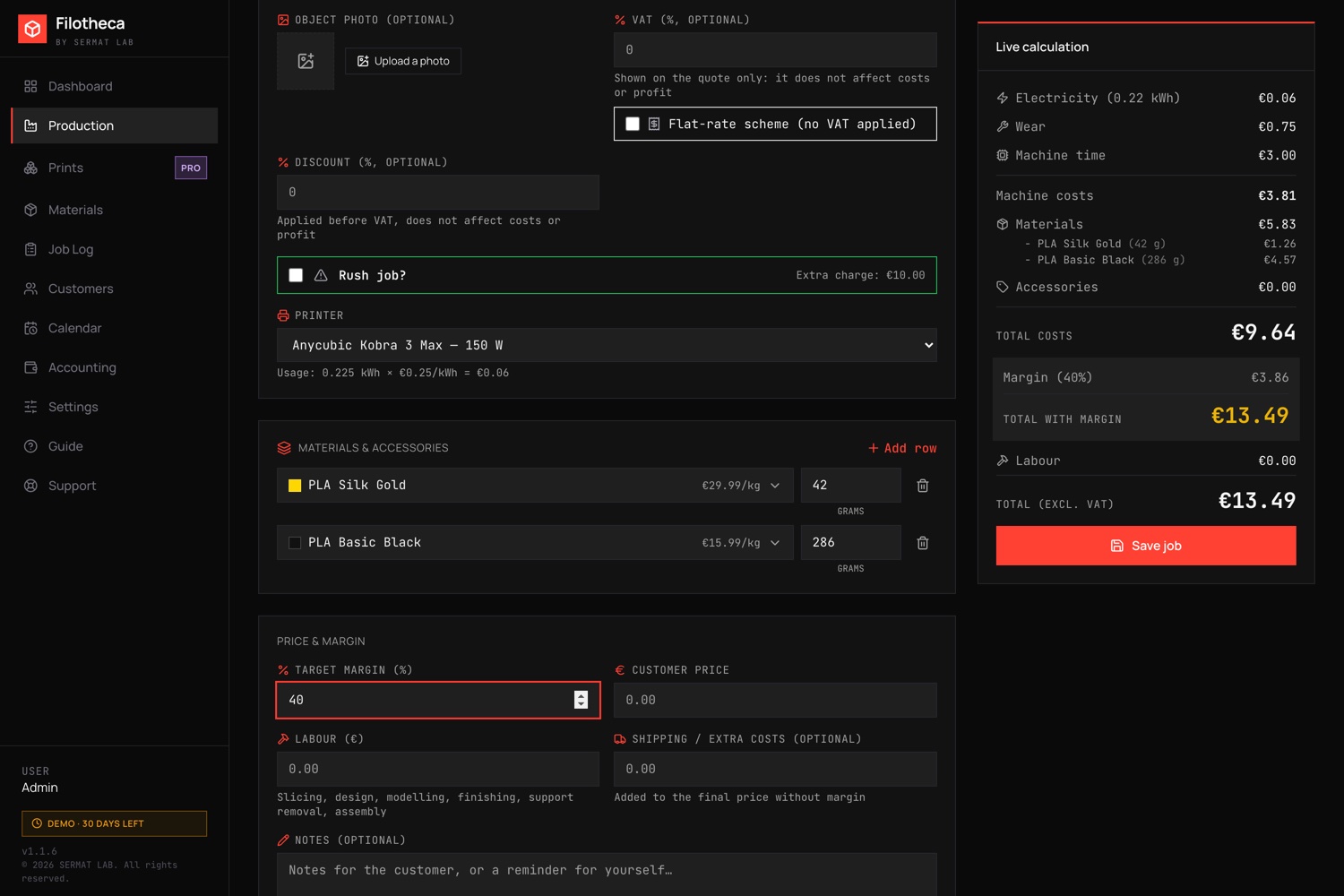
Live calculation. Every cost listed separately, and the price updates as you type. Click to enlarge.
Official colour catalogue · Anycubic & Bambu Lab
What it actually does
Five features, built for people who print and sell — not for people who code.
01
Costs worked out for you
Electricity, wear, machine time and materials: the right price for every job, recalculated as you fill the quote in.
02
Import from your slicer
Load the .3mf file exported by Anycubic Slicer Next, Bambu Studio or OrcaSlicer: printer, filaments, time and weight fill themselves in.
03
Official colour catalogue
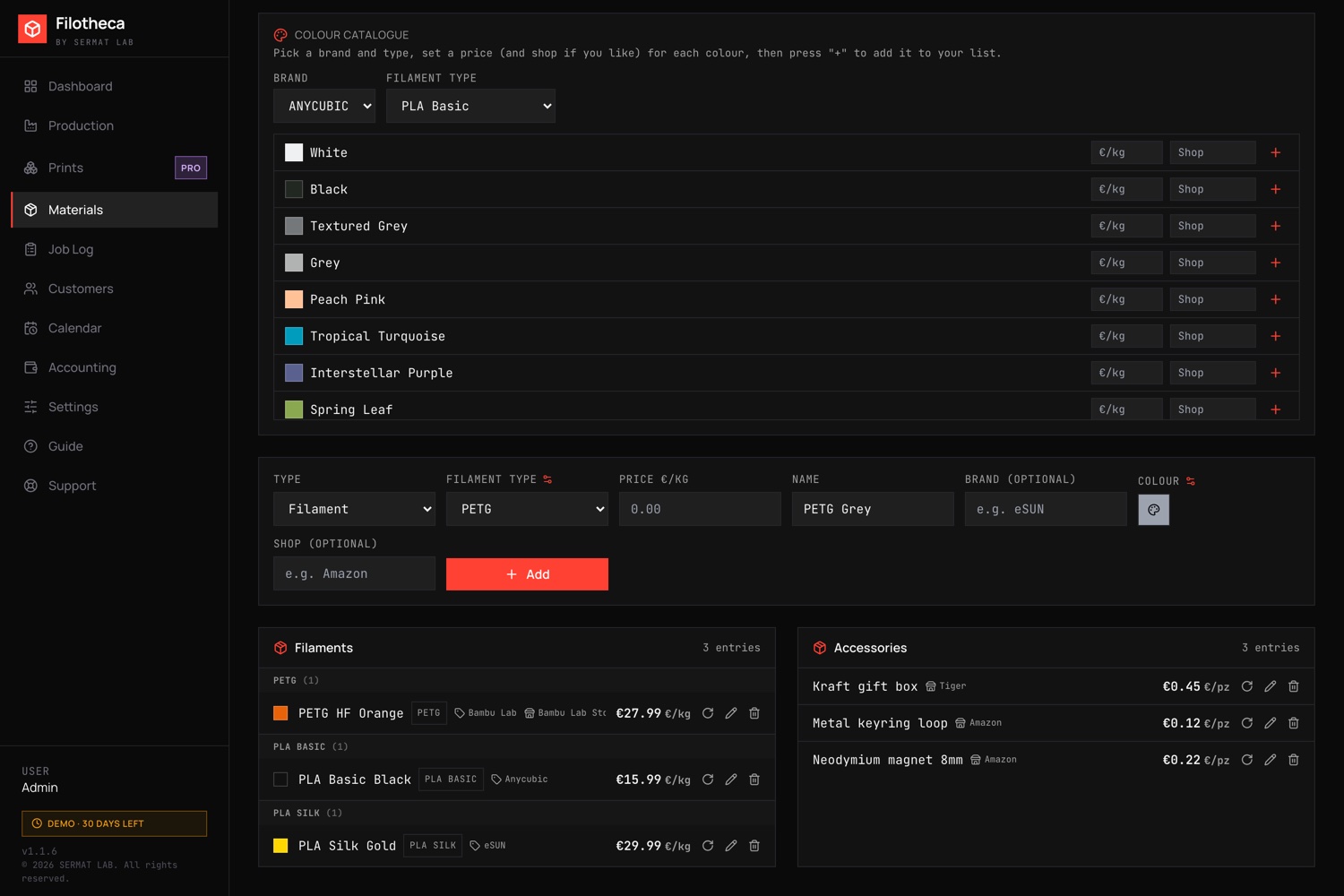
The original Anycubic and Bambu Lab palettes, ready to use: colour preview, price and shop in one click, with no hex codes to look up.
04
PDF quotes
Documents ready to send to the customer, with your heading, your logo and your business details.
05
Print archive
Find any project by name or code, and reopen the original file in your slicer with one click.
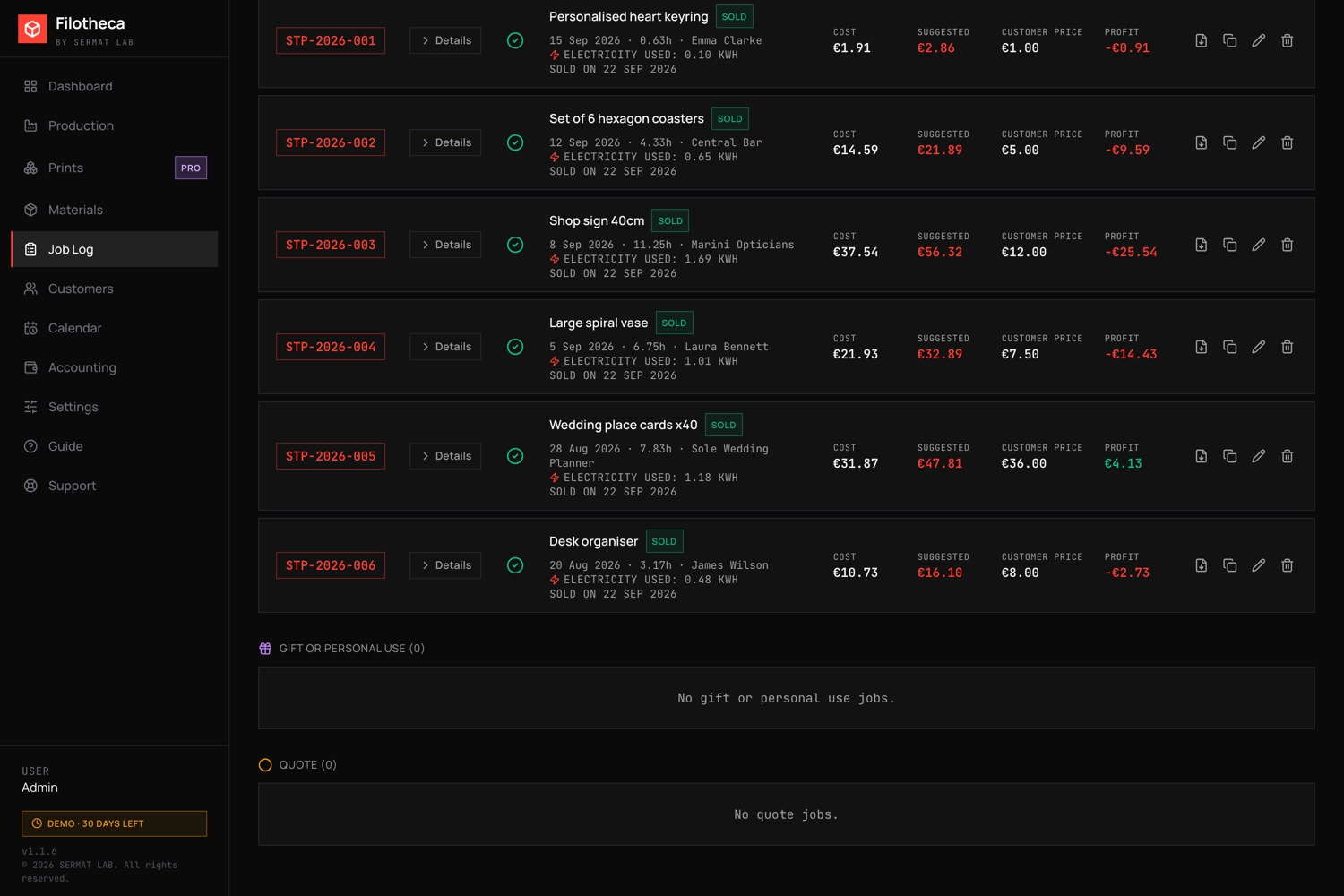
Job log. Cost, suggested price, price actually charged and profit, row by row. Click to enlarge.Colour catalogue. Pick brand and type, set price and shop, add it to your list. Click to enlarge.
Ready to try it?
30 days of the full program, no credit card. Available for Mac Apple Silicon and Mac Intel.
It happens to everyone and it isn't a fault in the program: Mac and Windows block software from developers who haven't paid for certification. You unblock it once, and from then on Filotheca opens like any other app.
macOS
Open the file you downloaded and drag Filotheca into the Applications folder, as usual.
Try opening it: a warning says that the developer could not be verified. Press Done or Cancel.
Go to System Settings → Privacy & Security and scroll to the bottom of the page.
It says Filotheca was blocked: press Open Anyway and confirm with your password or Touch ID.
Open Filotheca again: it asks once more, press Open. From then on it starts normally.
On versions of macOS before 15 a right-click on the app → Open was enough: if that still works for you, fine. On macOS Sequoia and later Apple removed it, and the steps above are the only way.
⊞ Windows 10 and 11
Open the file you downloaded: a blue window appears saying "Windows protected your PC".
Press More info, the small text under the message.
A button appears saying Run anyway: press it and the installation runs normally.
You don't need to turn off your antivirus or change any security settings: it's the standard warning for programs without a digital signature, and this is how you get past it.
Updates
What changes from one version to the next: new features and fixes, written for the people who use the program. If you already have Filotheca, this is where you see why it's worth updating.
1.2.129 September 2026
New features
The menu on the left reorders by dragging items wherever you like. The order stays on this computer and survives an app update.
A print can be marked as "Failed" (the main print or an extra piece): the cost — time and material already spent — still counts toward the job's total, with a reminder in the Job Log. Duplicating a job leaves failed pieces out.
The customer name fills itself in. Typing a name already used in an earlier job, in Production, fills in the email and phone on their own, with a dropdown suggestion of known names.
Fixes
Job Log: removed the "Ideal" column, which repeated a figure already shown in Production under a different name.
In the Dashboard, gifts were counted among the open quotes, inflating the potential earnings.
The calendar didn't mark today's date: it used a grey that was almost invisible on the dark background — now a red outline makes it stand out.
1.2.024 September 2026Mac · Windows
New features
New Catalogue section. It collects the products you show your customers, with a photo and a price, and generates a tidy PDF grid ready to send or print. You add an entry by ticking "Add to catalogue" when you record a job in Production; from then on it lives on its own — name, price and photos change without touching the original job.
A job can be made of several separate prints. For things you assemble from parts: the "Add another print to this job" button opens an extra piece with its own name, print time, printer, materials and photo, and its costs add up to the first print's under the same Print ID. In the Job Log the row shows the total hours, and opening the details shows how long each print took and how much it cost.
Two new filament types ready to use: PLA Matte and PLA Silk, alongside PLA, PLA+ and PETG.
The Job Log can also be sorted by code (e.g. STP-2026-001), as well as by date, cost and profit.
Fixes
The screen for loading your licence stayed black in the full version before activation, and the same happened to the trial-expired screen after 30 days: all you saw was the black background. It had been there since 1.1.9, on both Mac and Windows.
A material picked without a quantity was silently dropped when saving. A warning now explains it and asks for confirmation before saving.
In Accounting, gifts showed up among the pending quotes and inflated the potential earnings, even though they will never be money coming in.
After editing a material, the list no longer sorted itself alphabetically until the page was reloaded.
Moving to another section from a point scrolled down, the new page opened already scrolled and cut off the content at the top.
The expense date picker in Accounting was the browser's own, different from the one used everywhere else in the app.
1.1.1023 September 2026Mac · Windows soon
New features
Export and import all your data. A new "Data" section in Settings: one button saves your jobs, materials, printers and settings (photos and .3mf files included) into a single file; another one reads it back on another computer. Made for people who use Filotheca on two computers without ever working on both at once: export from one, import on the other, and pick up where you left off.
1.1.922 September 2026Mac · Windows
Fixes
Full check of the English translation: found and fixed around thirty pieces of text that stayed in Italian even with the language set to English. Among the most visible: the filament type in the Materials Colour Catalogue, the update-available notice, the licence activation and trial-expired screens, the whole Support page, the slicer import (.3mf) window, and the dates on jobs (Job Log, Accounting, Prints, Calendar), which stayed in Italian date format even in English.
1.1.822 September 2026Windows
Fixes
In English, the currency menu showed the names in Italian. "EUR — Euro (Italy and the euro area)" showed up identically even with the app set to English. Now it follows the translation like the rest of the program.
1.1.722 September 2026Mac · Windows
Fixes
Bug fix.
1.1.622 September 2026Mac only
New features
Filotheca speaks English. The whole program is available in Italian and English: you choose the first time you open it — with your computer's language already selected — and switch whenever you like from Settings. Every screen is translated, along with the full Guide and the quote PDF.
You can choose your currency. Euro, pound, dollar and the currencies of EU countries that don't use the euro. It's not a conversion: the numbers you entered stay exactly the same, only how they're written changes — along with how numbers and dates are written, which follows the language you pick.
New Customers section. It gathers the names you type into jobs, with nothing to register by hand. Open a customer to see everything you printed for them, with what they spent, and the Repeat button that reopens that job already filled in — useful when they ask for something you've already made. Sort by date, alphabetically, or by period.
A job can be a gift or a print for yourself. Alongside Quote e Sold c'è ora Gift or personal use: prints made with no money in finally have the right box.
A "restocked" button on materials. Buy the same colour again at a different price, and the circular-arrow button asks only for the new price.
Button descriptions appear instantly, in the app's own style.
A confirmation after updating, and instructions to unblock the app right inside the install disk.
A form to suggest a custom program, on this site.
Fixes
The quote PDF prints the price charged to the customer, not the calculated total.
On Mac the quote generates a PDF without going through the print window.
No more double "Quote" in the PDF heading.
Duplicating a job no longer left the screen blank.
1.1.519 September 2026Mac only
New features
Filotheca tells you when a new version is out. When you open it, a panel lists what's new and what's been fixed, and gives you two choices: update now, or put it off — in which case the notice comes back in a few days. You no longer have to visit the site to find out something came out.
Fixes
Links to web pages did nothing. They were blocked inside the program: now they open in your browser, as you'd expect.
1.1.419 September 2026Mac only
New features
You can hide the printer on the quote. In Settings, among your business details, a tick removes the "Printer" line from the PDF: it's for people who'd rather the customer didn't know which machine they work with. It stays visible by default, as before.
Fixes
The quote showed the calculated total instead of the price charged to the customer. If you entered a "Customer price" different from the total, the PDF still printed the total: the customer received a figure that wasn't the one agreed. Now it prints the price you decided.
On Mac the quote still went to the print window. The automatic PDF generation announced in 1.1.3 had only made it into the Windows package. Now it's on Mac too: press the button, choose where to save, and the document opens.
The word "Quote" appeared twice at the top of the sheet. The top left shows the business name from Settings: anyone who left it empty found the same word already printed on the tag to the right.
1.1.318 September 2026
New features
Filotheca comes to Windows. First version for Windows 10 and 11, with the same features as the Mac version: same program, same built-in database, nothing extra to install.
The quote becomes a real PDF, without going through the printer. Press the button, choose where to save, and the document opens. Before, the system print window appeared, where on Windows the option to save as PDF isn't even obvious.
The trial-ended screen now accepts a licence. It used to just say to contact support, and was a dead end: now there's a button to load the file you received by email. Jobs, materials and settings stay where they are and come straight back.
Need more time to try it? Write to support@sermatlab.it and we'll look at an extension: it arrives as a file you load into the app, with no need to wait for a new version.
An extended trial shows in the sidebar: Extended trial · N days left.
1.1.218 September 2026
Changes
The name becomes SERMAT LAB. The updated name appears on the splash screen, in the sidebar, on the quote PDF and in the copyright notes. Only the displayed name changes: jobs, materials, settings and licence stay where they are.
New support address: support@sermatlab.it. It's now also written out in full on the Support page, so you can copy it and write from another device.
1.1.118 September 2026
Fixes
The quote PDF button now works. In the installed app nothing happened: the quote was prepared in a new window, and new windows are blocked inside the app. Now it goes straight to the print window, where you choose Save as PDF.
Materials no longer disappear when you edit a job you already saved. Going straight to Job Log → Edit, the job opened with an empty materials row: on saving, it lost its filaments and the cost collapsed.
1.1.016 September 2026
New features
Import from your slicer. You load the .3mf file exported by Anycubic Slicer Next, Bambu Studio or OrcaSlicer and the job fills itself in: printer, filaments, time and weight. The project's colours are recognised even when they don't exactly match the ones on your list.
Print archive. Every print recorded with its slicer file, with an identifying code, a preview and a search by name or code.
Open straight in your slicer. Reopen the original project with one click, without hunting through folders.
Official Anycubic and Bambu Lab colour catalogue. Around 210 colours ready to use, with a preview, price per kilo and shop.
A Mac Intel version alongside the Apple Silicon one.
Fixes
The import window no longer opens off-centre.
The colour picker no longer ends up behind the open window.
The Accounting columns line up like the others.
The app no longer shows the old page after an update.
On Mac the "damaged file" warning is now just the ordinary unverified-developer warning, which you get past with right-click → Open.
The household budget. Enter the month's income, decide how much to set aside and what share goes to each item: Hank splits it up, keeps count of what you spend and carries what's left into the next month. For Mac, iPhone and iPad.